

How UTM Codes Add Power Steering to Your Marketing
Reading Time: 7 minutesAuthor:
For marketing to be successful, you don’t need a gut feeling or vanity metrics. You need data. UTM tracking codes move your marketing plan from hoping and praying to a precise, measurable science. UTM codes tell you exactly which efforts are moving you toward your SMART objective and which are draining your budget.
Most business owners are making decisions without this certainty. They’re relying on gut feeling, platform vanity metrics, or whatever their marketing person tells them is “working.” According to a 2024 study by Ruler Analytics, 64% of marketers struggle to prove the ROI of their marketing activities. That’s not a skills problem; it’s a measurement problem.
If you can’t measure it, you can’t manage it. And if you can’t manage it, you’re just hoping your marketing works instead of knowing it does.
Hope is not a strategy.
This is where UTM tracking codes come in. They’re not sexy, and they won’t make your graphics pop. But they will tell you exactly which marketing tactics are worth your time and budget, and which ones are quietly bleeding your resources dry.
We recently had a real-world experience with this. A client called and told us he wanted to stop posting on LinkedIn and put more effort into YouTube. Because we used UTM tracking, we had the receipts and could show him that LinkedIn was the source for the majority of his traffic.

Get Digital Tips & Tricks Delivered to Your Inbox

Let me show you how to use them.
Measurement is Power Steering
For marketing to be successful, you need meaningful data.
“Our Facebook page has 5,000 followers!”
“We got 200 clicks on that email!”
“Our Instagram engagement is up 40%!”
None of those metrics matter because they’re not connected to actual business outcomes. Likes don’t pay your bills. Impressions don’t cover payroll. And clicks without conversion are expensive entertainment.
UTM tracking codes move your marketing plan from hoping and praying to a precise, measurable science. They turn decion making from hunches to confidence. They tell you exactly which efforts are moving you toward your SMART objective and which are draining your budget.
The businesses I work with, companies doing $600K to $2M annually, don’t have unlimited marketing budgets. They need to know which channels are bringing in qualified leads and which are just making noise.
Without proper tracking, you’re essentially driving your marketing with your eyes closed, hoping you end up somewhere profitable. With UTM codes, measurement becomes strategic, and you’ve added power steering to your marketing.
How UTM Codes Do What They Do

When someone clicks a link and lands on your website, Google Analytics knows they arrived. But without UTM codes, it lumps that traffic into broad, mostly useless categories. “Social media” tells you nothing. “Direct traffic” is a black box. You’re left guessing which specific post, email, or ad actually drove that visitor.
UTM codes change that. They’re small pieces of text you add to any URL that tell your analytics platform exactly where that click came from, how it was delivered, and which campaign it belongs to. It’s the difference between knowing “someone came from social media” and knowing “someone clicked the link in our LinkedIn post about a blog post that we published on March 15th.”
Here’s a simple example. Your normal URL might look like this:
https://inn8ly.com/the-zen-marketing-frameworkA URL with UTM tracking codes looks like this:
https://inn8ly.com/the-zen-marketing-framework?
utm_source=linkedin&utm_medium=social&utm_campaign=blog_traffic
You’re not coding anything. You’re using a short text string to tell GA4 where your traffic comes from so you can make smarter decisions about where to invest next.
In the above example, the text after the question mark tells Google Analytics that this visitor came from LinkedIn, arrived via a social media post, and was part of your blog traffic campaign.
UTM stands for Urchin Tracking Module, named after Urchin Software, which Google acquired in 2005. I’m a wealth of useless information.
The Five Parameters That Actually Matter
A UTM code has five parameters you can use. Three are required, and two are optional but useful in specific situations.
The Three You Need
Source identifies where the traffic originated. Is it coming from Facebook? Pinterest? Your email newsletter? A partner website? This answers your “what platform” question.
Medium describes how it was delivered. This is your “what type of tactic” answer. Was it a social post? A paid ad? An email? A referral link?
Campaign clarifies which specific marketing initiative drove the click. This is your “what promotion or goal” answer. Are you running a spring sale? Promoting a new product? Driving traffic to thought leadership content?
The Two That Are Optional (But Sometimes Critical)
Term is primarily used for paid search campaigns to identify which keywords triggered your ad. If you’re running Google Ads or Bing Ads and want to know which search terms are converting, this parameter becomes essential.
Content helps you differentiate between links that point to the same URL. It’s useful for A/B testing. For example, if you’re testing two different call-to-action buttons in the same email to see which one drives more clicks.
Creating Your First UTM Code in 90 Seconds or Less
Google provides a free tool called the Campaign URL Builder. You add your website URL and fill in the parameters we just discussed. The tool generates your tracking URL automatically.
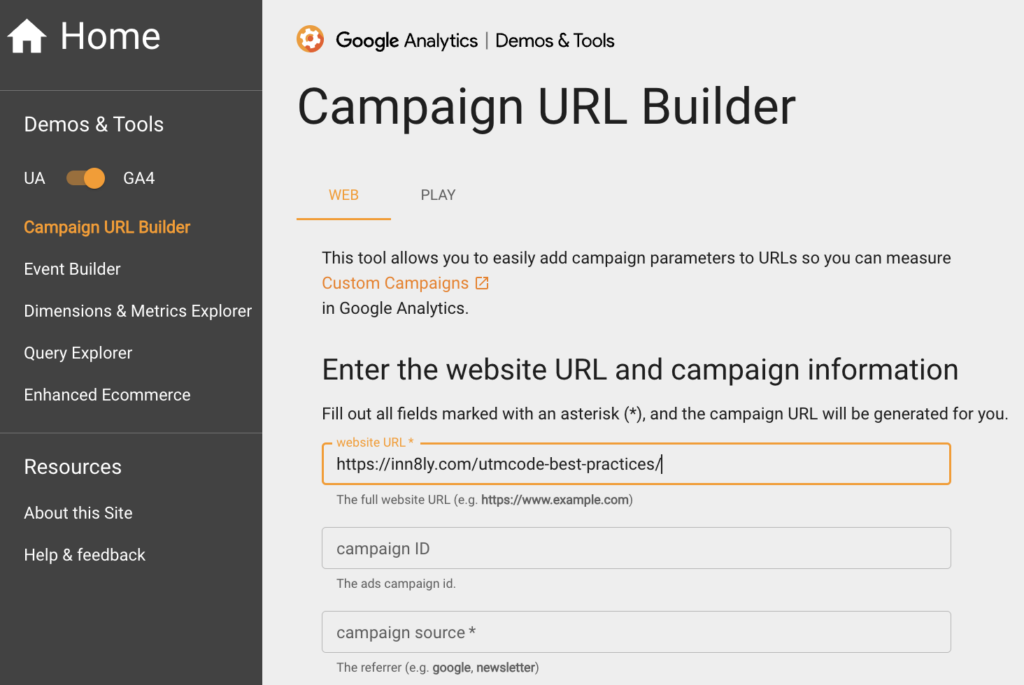
Here’s what you need before you start:
- The page you want people to visit
- Where you’re sharing the link (source)
- How you’re sharing it (medium)
- Which campaign it belongs to
That’s it. The tool does the rest.
But here’s where most people screw this up: inconsistent naming. If you use Facebook in one code, facebook in another, and fb in a third, Google Analytics treats those as three different sources. Your data gets fragmented, and you can’t see the full picture.
Follow these rules to keep your tracking clean:
Always use lowercase. Analytics platforms are case-sensitive. Facebook and facebook are treated as different sources.
Replace spaces with underscores or hyphens. Use spring_sale or spring-sale, not spring sale.
Be consistent across your entire team. If you call your newsletter newsletter, don’t let someone else call it email_blast next week. Create a naming convention document and stick to it.
Keep it simple. Use tags that make sense at a glance. Future you (reviewing data six months from now) will appreciate current you for using clear, intuitive labels.

Where Smart Marketers Use UTM Codes
You can use UTM codes anywhere you’d normally drop a link. Here are the high-impact opportunities you should consider.
Social Media Posts
Let’s say you’re promoting a new blog post across LinkedIn, Facebook, and Instagram. Create a unique UTM code for each platform. Same content, different sources. Now you can see which platform drives the most engaged traffic.
You can also use UTM codes in your bio links, Stories, and anywhere else you’re directing people back to your website. The goal is to separate the traffic so you can see what’s working.
Email Marketing
Your email service provider will show you open rates and click rates. That’s fine. But UTM codes let you see the person who clicks’ behavior on your website.
Did they bounce immediately? Did they read three other blog posts? Did they convert into a customer? Your email platform can’t tell you that. Google Analytics can, but only if you’re using UTM codes.
Paid Advertising
If you’re running ads on Google, Facebook, LinkedIn, or any other platform, UTM codes let you track performance beyond the platform’s native reporting. You can see how paid traffic behaves compared to organic traffic, which campaigns drive the longest session durations, and which ads lead to actual conversions.
Content Syndication and Guest Posts
When you publish content on Medium, LinkedIn articles, or guest posts on industry sites, use UTM codes in any links back to your website. You’ll know exactly how much traffic each piece of syndicated content drives and whether it’s worth the effort.
Bonus Tip
In media where you cannot embed a link, you can use link-shortening services like Bitly to hide the UTM information. Paste the entire link into Bitly, and it will generate a shortened link that preserves the tracking information.
From Data to Decisions: What to Actually Measure
Having UTM codes is useless if you don’t know what to look for. The metrics you track depend on your objectives.
Water the flowers and prune the weeds.
If your goal is to identify which platforms drive the most qualified traffic, focus on these metrics in Google Analytics:
- Number of visitors per source
- Bounce rate (are people immediately leaving?)
- Average session duration
- Pages per session
- Conversion rate by source
If you want to compare the effectiveness of different marketing tactics (email vs. social vs. paid ads), analyze:
- Engagement metrics (session duration, pages per session) by medium
- Conversion rate by medium
- Cost per acquisition (if you’re tracking ad spend)
If you need to evaluate individual campaign performance, check:
- Campaign-specific conversion rates
- Revenue or sales data tied to each campaign
- Overall ROI by campaign
You’re not just collecting data. You’re using that data to allocate resources. If LinkedIn consistently drives high-quality leads while Facebook generates traffic that bounces, you know where to invest more time and budget.
Steer Your Marketing Budget with UTM Codes
Stop treating marketing like a slot machine. Pull the lever, hope something good happens, repeat. UTM tracking codes won’t make your marketing brilliant, but they will make it measurable. And once you can measure something, you can improve it.
With UTM tracking codes, you’ll know which platforms are performing and which campaigns are driving revenue. You’ll be able to identify the tactics you should kill and the ones that deserve more budget.
That’s not just better marketing. That’s marketing with power steering.
Want help setting up a complete measurement framework for your business? You can use this link to schedule a call, and we can talk about how to connect your marketing tactics to actual business outcomes.
Related Posts
-
Add Power Steering to Your Marketing
Learn how UTM codes turn hunches into confidence.
-
Marketing Math and Dashboards
Seven marketing math concepts that turn dashboards from decoration into growth decision engines.
-
The 6 Marketing Measurement Mistakes
The businesses that win will embrace marketing measurement to compound their wins. Six mistakes to avoid to be one of them.
Author: James Hipkin
Since 2010, James Hipkin has built his clients’ businesses with digital marketing. Today, James is passionate about websites and helping the rest of us understand online marketing. His customers value his jargon-free, common-sense approach. “James explains the ins and outs of digital marketing in ways that make sense.”
Use this link to book a meeting time with James.