OpenAI replaced your favorite models with GPT-5. They promised breakthrough intelligence, better reasoning, smoother workflows.
What you’re seeing?
You’re getting inconsistent outputs and generic responses, wasting your and your team’s time.
Here’s what nobody tells you. GPT-5 delivers substantial leaps in raw intelligence, coding capabilities, agentic task performance, and steerability compared to previous models. But its new architecture raises the cost of vague prompts. It follows instructions with surgical accuracy, which means the casual prompts that worked with GPT-4 now create expensive confusion.
The difference isn’t the tool. It’s how you talk to it.
Casual Prompts Create Expensive Noise
Get Digital Tips & Tricks Delivered to Your Inbox
Why You Are Getting Hit-or-Miss Answers
Think of it like hiring a contractor, then handing them vague directions. “Build me a nice house.” This gets you a confused stare and wasted billable hours. Provide them with blueprints, material lists, and clear specifications, and you’ll get what you envisioned and more.
With a clear understanding of the task, the contractor can bring their experience and creativity to bear, adding value that you may not have expected. GPT-5 works the same way, but with a crucial difference: it was built with enhanced agentic processing.
This means it’s trained to complete tasks autonomously and reach conclusions quickly. It won’t give you a confused stare; it will march off and try to provide you with an answer. This makes it incredibly capable, but also creates a new headache.
“Clarity is the most powerful form of persuasion.” ~ Bill Bernbach
GPT-5 Wants to Get to the End
GPT-5 is optimized to complete tasks efficiently, which means that without structured prompts, it prioritizes speed over quality. It’s like having a brilliant employee who’s eager to help but rushes through assignments when the instructions aren’t crystal clear.
When you send contradictory instructions or vague requests, GPT-5 burns its reasoning power (and tokens) trying to reconcile the conflict instead of solving your actual problem. Its intelligence amplifies everything, including the flaws in your prompts. That’s the “value gap” in action: poor prompts = poor output, no matter how smart the model gets.
AI is an amplifier, not a magic button. If your prompt is broken, your output will be too. ~ James’ism
The cost isn’t just time—it’s opportunity.
The Architecture Change That Changes Everything
To get to the solution, you need to understand what you’re really working with. GPT-5 isn’t just a bigger, smarter version of GPT-4. OpenAI fundamentally redesigned the architecture from models that you select to a sophisticated routing system that selects a model based on the clues in the prompt.
Now, when you send ChatGPT a prompt, an internal router analyzes your request and dispatches it to one of several underlying models: Base, Thinking, or Pro. Simultaneously, it sets reasoning levels (minimal to high) and verbosity levels based on signals it detects in your prompt.
What does this mean for you?
While you don’t choose the internal model variants directly, you can use your prompt to influence which one GPT-5 chooses.
Why This Matters For Business Users
The router is constantly making decisions about how to process your request. This means that phrases like “think step by step” trigger reasoning. Words like “brainstorm” activate creativity. What you say in your prompt matters.
Vague or contradictory instructions confuse the router, causing it to burn tokens trying to reconcile conflicts instead of responding to your request. Or what’s worse, the router will send your request to the wrong tool. This is why casual prompting feels harder with GPT-5. You’re not just talking to a model anymore; you’re steering a routing system with access to powerful engines that require precise navigation.
Earlier, I mentioned the confused contractor. To deliver value, she needs to understand, in detail, what you need. Ask for a house and you will get a house. Ask for a three-bedroom, three-bathroom home with a den and family room, and that’s what you’ll get and possibly more. If she isn’t working on figuring out what you want, then she can bring her experience into the conversation and suggest some things you hadn’t considered..
GPT-5 is more than a chatbot. It’s a precision instrument that requires intentional input to deliver exceptional output.
However beautiful the strategy, you should occasionally look at the results. ~ Winston Churchill
Structure Equals Strategy
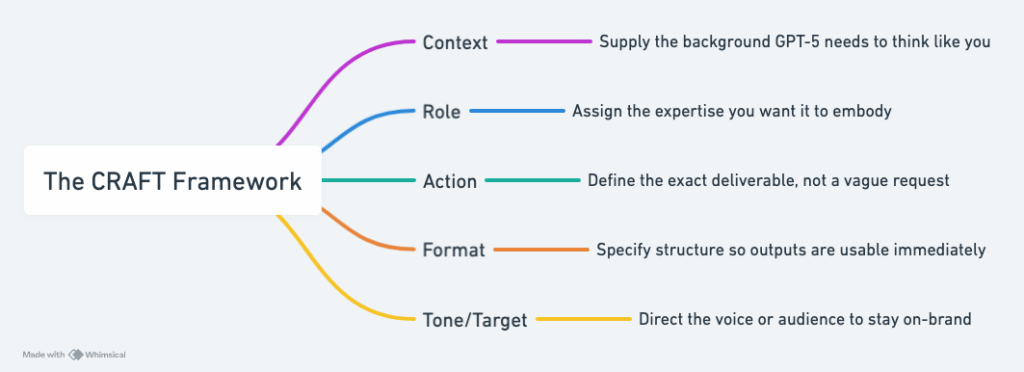
I‘ve mentioned the CRAFT prompt framework in several other posts. It’s an excellent framework that, by its nature, brings structure to prompts. It’s even more useful with GPT-5. When you and your marketing team use CRAFT, I guarantee that you will get higher-quality output from GPT-5.
Context: What background information matters?
Role: Who should the AI be?
Action: What exactly do you need?
Format: What structure do you want?
Tone or Target: Either, what voice should it use, or who is the target for the output?
This isn’t about being technical. CRAFT happens to be the framework I use. The real benefit is having a structured approach to your prompts. By spelling out context, role, action, output, and tone, the framework provides the router with the information it needs to perform efficiently and deliver consistent, high-quality results. However, any framework will give you better results than freeform prompting.
For marketing professionals who want to go deeper, read my post about AI tools for copywriting. Another valuable resource is 5 specialized AI prompt frameworks. These posts will give you more options to solve specific marketing challenges.
Why Structured Prompts Future Proof AI Interactions
LLMs will continue evolving. And guess what? They won’t send you a memo asking for permission to change their behavior. But when you master the strategic foundation of structured prompting, you have a principle that transcends any single model.
The CRAFT framework I mentioned above worked well with older models, and it works even better with GPT-5. This is why I haven’t had the same challenges that others have had. My prompts are structured. So I didn’t need to adapt when OpenAI introduced GPT-5 and the router architecture.
Structured prompts don’t just solve today’s inconsistencies; they future-proof your interactions as the models evolve. That’s the long-term benefit of structured prompting. Now we’ll look at four changes you can make to improve your results immediately.
Four Simple Changes That Boost Your AI Output Quality
The magic happens in the details. The four small shifts described below will deliver immediate improvements to your interactions with GPT-5.
Be explicit about everything. Tone, style, format, length; spell it out. GPT-5’s precision means vague terms are the enemy of good outputs.
Separate instructions into clean sections. Use headings, bullet points, or XML tags like <context>, <role>, etc., to organize your requests. The clearer the structure, the better the model’s comprehension.
Eliminate contradictions before sending. Review your prompts for conflicting instructions. GPT-5 will try to follow all of them, creating internal confusion that destroys quality.
Try the prompt optimizer tool. If you aren’t sure about your prompts, try OpenAI’s free prompt optimizer tool. It will transform a messy prompt into a structured, high-performing version, and it shows you exactly why it made each change. This is especially useful if you delegate AI use across your team. The prompt optimizer levels up everyone’s prompts quickly.
Try this example yourself.
Ask GPT-5 to write a marketing email using this prompt: “write a marketing email about the new automation feature for our SaaS project management tool.” Consider what you get.
Then start a new chat and use this prompt:
Context: We sell a SaaS tool for project management, and we’re launching a new automation feature Role: Expert email copywriter for B2B services Action: Use minimal thinking to draft a product feature launch email targeting small business owners Format: Subject line + 150-word body + clear CTA Tone: Professional but approachable
I tried it, and the difference was night and day. The first prompts gave me a long email packed with generic fluff. The second prompt generated a short, punchy email that delivered the news about the new feature quickly and clearly.
More Proof in Practice
How I Rebuilt My Own System Instructions
I had well-crafted system instructions that worked beautifully with GPT-4. The system instructions were attached to a ChatGPT Project I use to build the structure for blog posts like this one. Using GPT-4 with my system prompt gave me output that was detailed, strategic, and perfectly aligned with my audience’s needs.
When GPT-5 launched, I continued using the instructions. The output was serviceable, but not remarkable. Something felt off.
Then I applied the practices described in this article to restructure my system instructions for GPT-5’s architecture. This eliminated subtle contradictions I hadn’t noticed, organized the instructions into discrete sections, added explicit reasoning requirements, and inserted a self-reflection requirement.
The transformation was immediate. Responses became sharper, more strategic, and consistently aligned with my communication style. The same core input resulted in dramatically better output.
This isn’t theoretical optimization. If structured prompting can improve even well-designed system instructions, imagine what it can do for your everyday business workflows.
GPT-5 Power Moves
Trigger Words
There are trigger words that will unlock exponential improvements. Use these trigger words in your prompts to activate higher-level reasoning, or not, and improve the quality of the output: “think deeply,” “double-check your work,” “be extremely thorough.”
I’d call your attention to the CRAFT example I shared above. In it, this line, “Action: Use minimal thinking to draft a product feature launch email targeting small business owners,” was key to having GPT-5 give me something useful. Specifically, ‘Use minimal thinking’ was the trigger word that instructed the router not to provide an in-depth analysis. This resulted in a short, punchy email versus the long, fluffy email I got from the initial unstructured prompt.
What’s the Plan
But here’s the real power move: make GPT-5 plan before it answers.
Instead of jumping straight into execution, prompt it to outline its approach first. Now you can see its plan and identify gaps, map dependencies, and create a structured approach before the Chatbot executes. Basically, you can adjust the direction and fill in the gaps.
Get Clarity
Another power move is to write your prompt and, at the end, add something like this. “Before you start, ask me clarifying questions to be sure you can give me valuable output.”
Iteration for the Win
And if you find the AI’s response needs adjustment, try using the Prompt Iteration technique: return to your original prompt, select edit, refine it, and submit it again to restart the session. This process is also known as Iterative Refinement. It ensures the AI receives clear, unambiguous instructions, helping you maintain context and achieve higher-quality results. It’s especially useful with complex interactions.
The quality improvement is measurable: fewer revisions, faster drafts, and higher quality across all your AI-powered efforts.
Self-Reflection Rubrics
This powerful tool transforms single-draft requests into multi-iteration perfection without you seeing or participating in the messy middle steps.
Tell GPT-5 to first create a private rubric with 5-7 categories that define “excellence” for your specific task. It then drafts, critiques, and rewrites its answer against that rubric until it meets the high standard it set for itself. You only see the final, polished result.
In my experience, quality often improves dramatically, sometimes by 30 – 40%. It’s particularly effective for complex tasks like developing advanced spreadsheet formulas or detailed strategic analyses.
Here’s a sample self-reflection prompt: “Before answering, create a private rubric with 5-7 criteria for excellence on this task. Draft your answer and critique yourself against the rubric. Redo iterations until it passes each category. Keep this internal and only show me the final result.”
For high-stakes business content, get specific about your rubric categories. Instead of letting GPT-5 choose, specify criteria like “Hook Strength,” “Skimmability,” “Tone Consistency,” and “Actionability.” Use whatever makes sense for the task at hand.
The result?
Near-final drafts that require minimal editing. This lets you focus your effort on making the draft better, rather than burning time and tokens in back-and-forth revisions just to make it correct.
These power moves are foundational techniques that will improve your results, but there are even more things you can do when the stakes are highest and you need more precision.
Three Advanced Controls That Deliver Professional-Grade Results
For business-critical tasks, the following triggers control how GPT-5 engages its tools. Use them sparingly but strategically.
Control agentic eagerness based on your needs. For quick answers, limit tool use and stop early. For complex analysis, encourage persistence and thorough research. The model adapts its approach to match your timeline.
Limiting example:
“Search depth: very low. Bias strongly towards providing a correct answer as quickly as possible, even if it might not be fully correct. Maximum of 2 tool calls. If you need more time to investigate, update me with your latest findings and ask to proceed.”
Encouraging example:
“You are an agent. Keep going until this query is completely resolved before ending your turn. Never stop or hand back when you encounter uncertainty. Research or deduce the most reasonable approach and continue. Only terminate when you’re sure the problem is solved.”
Dial in verbosity controls to get exactly the amount of explanation you want. Sometimes you need a comprehensive analysis. Sometimes you need bottom-line conclusions. GPT-5 can deliver both on command.
High-verbosity example:
“Provide a detailed explanation with step-by-step reasoning, multiple examples, and comprehensive background context. Think through this thoroughly and show all your work.”
Low-verbosity example:
“Give me just the essential answer. Skip explanations, examples, and background unless absolutely critical. Be direct and concise.”
Add factual reliability checks for research and planning tasks. Prompt GPT-5 to flag uncertainty and verify claims. This is critical when you’re making decisions based on AI analysis.
“Before providing your final answer, review your response for potential inaccuracies. Flag any claims you’re uncertain about with [UNCERTAIN] and explain your confidence level. If you’re making assumptions, clearly state them. Prioritize accuracy over completeness.”
These aren’t parlor tricks. They’re advanced tools that deliver measurable improvements in accuracy, consistency, and speed.
Strategy First, Always
I wrote this post to respond to the comments I saw from people frustrated with GPT-5. I wasn’t experiencing what they described and started wondering why. I believe it comes down to two things:
The fact that my prompts were already well structured, I’m a big fan of the CRAFT framework, and
The companies winning with AI aren’t the ones with the biggest budgets. They’re the ones with the clearest strategies. ~ James’ism
Structured prompting isn’t a hack. It’s a strategy for extracting real business value from AI today and in the future.
The business owner who masters structured prompting won’t just save time; they’ll gain a sustainable competitive advantage through better AI-powered decision-making.
If you want GPT-5 to be more than a magic 8-ball, the first step is upgrading your prompts.
Since 2010, James Hipkin has built his clients’ businesses with digital marketing. Today, James is passionate about websites and helping the rest of us understand online marketing. His customers value his jargon-free, common-sense approach. “James explains the ins and outs of digital marketing in ways that make sense.”