

A 10-Minute Setup That 10x’s ChatGPT’s Usefulness – No Prompt Geekery Required
Working with ChatGPT without optimized Custom Instructions is like rehiring a consultant and re-explaining your business at every meeting.
Most users skip personalization entirely or complete it with generic fluff. Then they wonder why their AI conversations feel rudderless, why they’re constantly re-explaining context, and why results vary wildly from chat to chat.
Investing ten minutes to set up Custom Instructions and More About You correctly will transform your conversations with ChatGPT. This one simple thing will move your interactions from a guessing game into dialogue with a business partner.
Why This Works or How One Plus One Equals Three
“AI is an amplifier, not a magic button. If your prompt is broken, your output will be too.” — James’ism
Structured prompts will deliver remarkable results, but even the most carefully crafted prompt will provide inconsistent output if the AI doesn’t understand your business context.

Get Digital Tips & Tricks Delivered to Your Inbox

GPT-5’s architecture rewards clarity and punishes vagueness (OpenAI Prompting Guide). Custom Instructions (your context) + structured prompts (your questions) = consistently higher-quality outputs.
The insight: Custom Instructions provide the foundation. Structured prompts guide the conversation. Working together, they amplify each other for even better outputs.
Custom Instructions and the Two Boxes That Change Everything
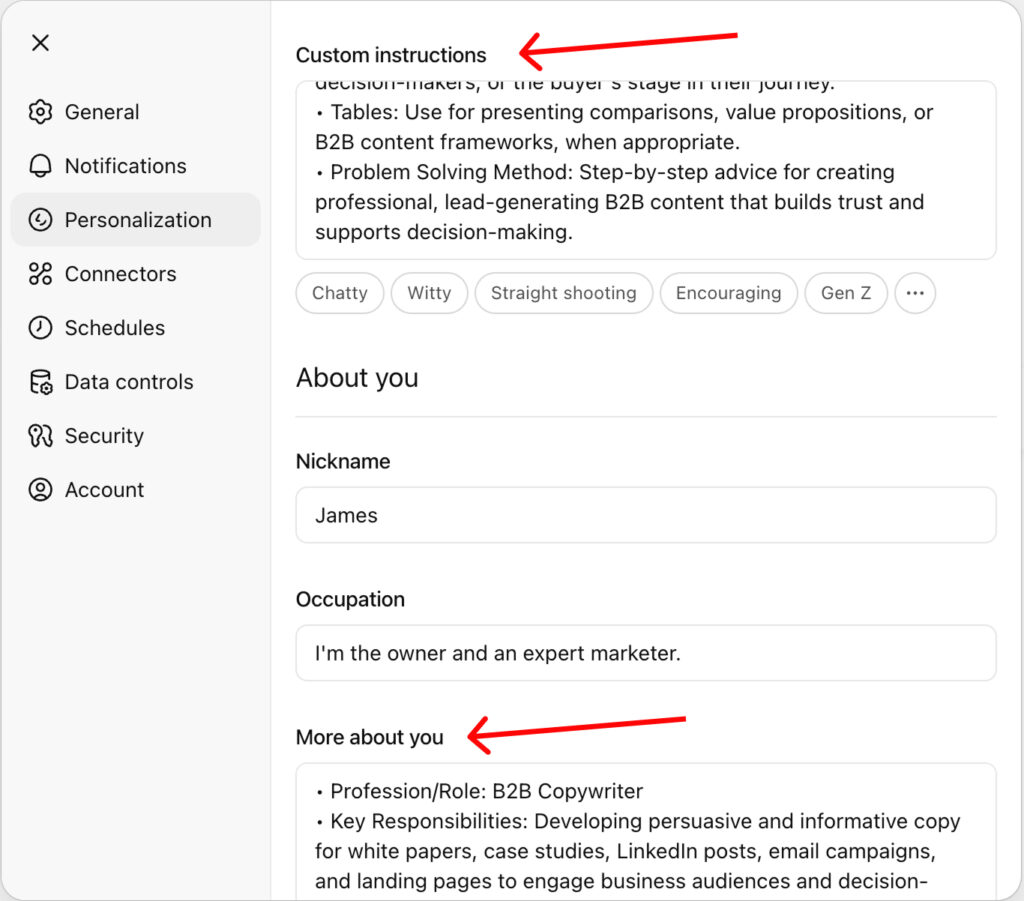
Try this yourself. Delete your existing personalization if you have something in place, and give ChatGPT a simple task. For example, “Draft a welcome email.” You’re going to get generic, off-brand content that’s likely unusable.
Then, using the process described here, add and save your updated personalization: Custom Instructions, More About You, and start a new chat, where you’ll ask again for a welcome email. The output will be a near-ready-to-send email that’s on-brand.
So, where are we? What have we established?
Custom Instructions and More About You operate at the system level. They set the foundation before you even start.
Structured prompts operate at the conversation level. They guide individual interactions.
For your personalization to be a solid foundation, you need to understand the role that each of the two boxes takes.
Box 1: Custom Instructions
Explain how your want ChatGPT to respond:
- Start with the answer (3–5 lines, bullets allowed)
- Provide an action plan (3 steps, with owners + timing)
- Offer 1–2 alternatives or trade-offs
- Show reasoning only if I say “show work” or when the risk is high
- If ambiguous, ask up to 3 clarifying questions before proceeding
Box 2: More About You
Here’s a 90-Second Template (≤120 words) you can use:
- Role & expertise
- Target audience (Ideal Customer Profile)
- 3 core goals
- 3 key constraints (budget, tone, compliance)
- Voice/style rules
- Success metrics
- “Banned” phrases/behaviors
Use what’s above as a starting point. Experiment. Find what works for you and how you use the AI.
Caution: Don’t use client names, PII, or proprietary data. Use placeholders (e.g., “ClientCo”) and summarize compliance requirements at a high level.
These two boxes in your ChatGPT personalization settings are the foundation of every conversation. Now the AI knows who you are and understands how it should communicate with you. When you combine this foundation with structured prompts, each conversation builds on a solid base instead of starting with one arm tied.
Your 5-Minute Setup
Setting this up takes less time than your coffee break, but first, you need to find the boxes. Look for and click your face in the lower left corner of the screen.
- Go to Settings → Personalization
- Paste Box 1 content into the box labeled “Custom Instructions”
- Paste Box 2 content into the box labeled “More About You”
- Save and enable for all new chats
That’s it. Once saved, this becomes your baseline for every new conversation. No more cold starts. No more re-explaining your business context. Every chat begins with ChatGPT already understanding who you are and how you want it to respond.
But why stop at one?
Custom Personas: Your Database of AI Business Partners
I maintain a database of personas our team uses depending on the task. For example, I have a:
- California contracts lawyer for reviewing agreements
- Content marketing editor for blog post feedback
- Financial strategist for budget analysis
- Spreadsheet wiz to build complex formulas
A use case: When we need FAQ responses for a client, we switch to the customer support persona. It understands how to communicate with customers, the importance of brand voice, and how to empathize with customer pain points. Instead of explaining context every time, we simply activate the persona that’s most relevant to the task we’re working on.
Another example: We use UTM codes to track the performance of our clients’ marketing. Adding a UTM tag to a link isn’t hard, but time is money, and manual processes are prone to error. I used my spreadsheet wiz persona and asked ChatGPT for a formula that would take the entered data and create the URL with the UTM tags attached. I got exactly what I needed in a few minutes. No more copy and paste. Add the data, and BAM! we’ve got the URL we need.
But before you charge ahead, there are some things you should consider when building your custom personas. Specifically:
- Purpose and scope
- Primary data sources
- Jurisdiction/compliance constraints
- What it won’t do (e.g., legal advice)
- Output format (bullets, steps, etc.)
- Escalation rules (when to ask you for input)
Once you’ve tested a persona, add it to the database for your team.
Each persona becomes a specialized AI partner for specific business functions. Your persona database is a repository of stored expertise that pairs naturally with day-to-day tasks.
The ROI: A persona database transforms random prompting into a team-wide repeatable system that speeds up workflows, standardizes quality across your team, and compounds value.
The ROI of Ten Minutes
“Time is more valuable than money. You can get more money, but you cannot get more time.” — Jim Rohn
Let’s quantify the impact of ChatGPT’s personalization settings:
Assume five employees, 2 AI sessions/day, 5 min saved/session → ~20.8 hours/month.
At $150/hr = $3,120/month.
Even at half the savings, that’s ~$1,560/month.
A one-time 10-minute setup that pays dividends every day.
Your reclaimed hours shift to value creation. Strategy development. Client relationships. Revenue-generating activities.
Bottom line: Ten minutes of setup translates into measurable business impact and stronger ROI on every AI-assisted task.
Your Next Move

Most business owners treat AI like a fancy search engine. Optimizing ChatGPT’s personalization settings is a low-cost, high-reward way to improve the value of your interactions with AI. It turns AI into a strategic business partner that understands your context, speaks your language, and delivers consistent value.
Personalization (Custom Instructions and More About You) + structured prompts = competitive advantage.
While your competitors are still explaining their business context in every conversation, you’re already three steps ahead with AI that knows how to serve your specific needs.
The setup takes ten minutes. The payoff compounds forever.
Related Posts
-
LLMs Don’t Think. They Amplify.
LLMs don’t know when they’re wrong. But, when used with intention, LLMs will raise the ceiling on quality.
-
AI Marketing Workflows
Build an AI marketing workflow that connects AI tools into one smooth system.
-
From Temp to Team Member
How to unlock the potential of Custom GPTs and Projects to improve AI performance.
Author: James Hipkin
Since 2010, James Hipkin has built his clients’ businesses with digital marketing. Today, James is passionate about websites and helping the rest of us understand online marketing. His customers value his jargon-free, common-sense approach. “James explains the ins and outs of digital marketing in ways that make sense.”
Use this link to book a meeting time with James.